RedM Loading Screen — cLoadingscreen (Open Source)
Welcome RedM players with a customizable loading screen, music playlist, live loading progress, server changelogs and social links.
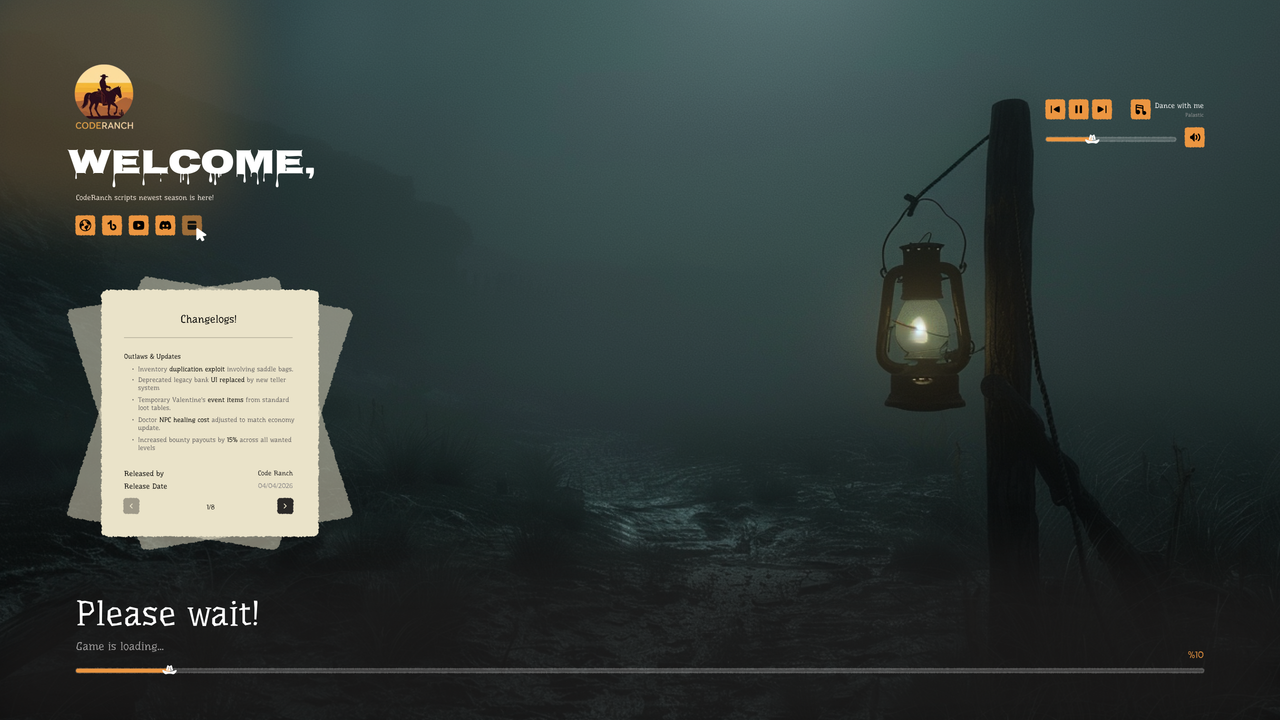
Features and gameplay
CodeRanch Loading Screen
Premium Loading Screen for RedM
A modern, fully customizable loading screen with a built-in music player, changelogs panel,
social media links, and smooth animations — designed for the best first impression on your server.
What This Script Does
For Players:
- Enjoy a smooth, animated loading experience with real-time progress tracking
- Listen to music with a full player: play, pause, skip, previous, and volume control
- Volume and selected track are saved per player across sessions
- Browse server changelogs with paginated entries directly on the loading screen
- Access server social links (Website, TikTok, YouTube, Discord) with one click
- See dynamic loading status messages as the game progresses
System Features:
- Real-time loading bar powered by RedM's native loadProgress event
- Built-in music player with multi-track playlist support and auto-advancement
- Player volume and track selection persisted via localStorage
- Mute/unmute toggle with smooth icon fade transitions
- Changelogs panel with slide-in animation and page navigation
- Highlight support for changelog entries (bold/colored keywords)
- Animated percentage counter with slide transitions
- Social media buttons with native RedM URL opening (invokeNative)
- Customizable server icon, all UI texts (locales), music playlist, social links, and max volume
- Escrow-friendly: customers only edit config.js, server-icon.png, and music files
- Fully configurable via config.js — no code changes needed
- Automatic shutdown on player spawn
CodeRanch Scripts - Professional RedM Development
Before you buy
Check the listed dependencies and the product documentation against your RedM server setup. The product description lists Standalone. Confirm version and integration requirements before installing.
This is the open source edition. Review the included files and license before planning custom code changes. Compare escrowed and open source scripts.
Read the RedM script installation checklist, review the refund policy, or contact CodeRanch support with compatibility questions.
Related Scripts